

Introduction
In the digital landscape, network security is of paramount importance to protect sensitive data and ensure the integrity of your network. One effective solution to enhance network security is by implementing a Network Address Translation – NAT firewall. Network address translation is a technique that allows you to map multiple private IP addresses to a single public IP address, providing increased network defense and encryption.
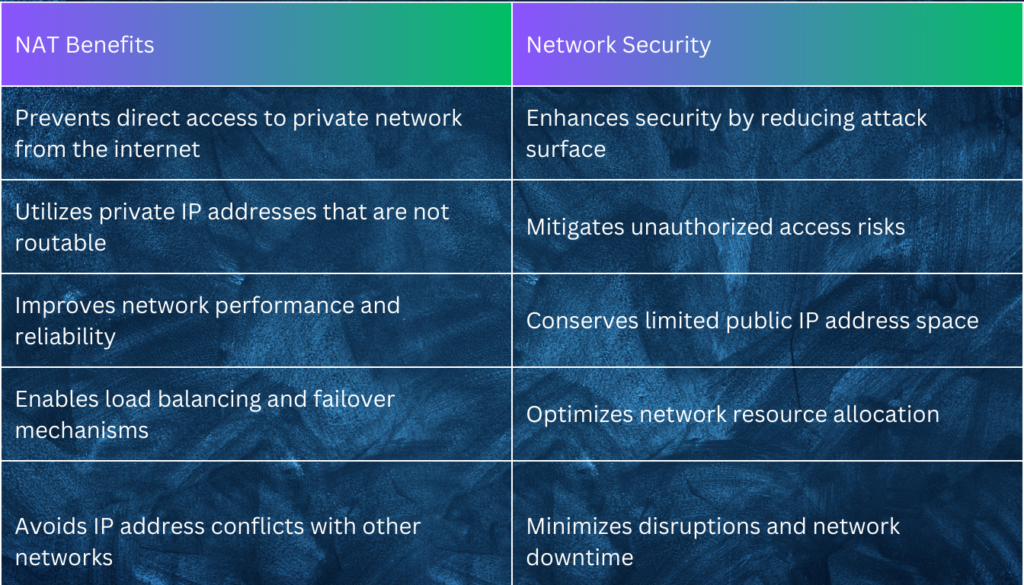
A NAT firewall offers numerous benefits for securing your network. By hiding the internal structure and hosts from the outside world, NAT reduces the attack surface and strengthens network encryption. It prevents direct access to your private network from the internet, utilizing private IP addresses that are not routable on the internet, further enhancing network security measures.
Implementing a NAT firewall enhances the performance and reliability of your network. To deploy a NAT firewall, you need a device capable of performing NAT functions, such as a router or firewall. It is important to use NAT in conjunction with other security measures like virtual private network (VPN), encryption, authentication, authorization, and filtering for comprehensive network security.
Points to Note:
- Secure your network and protect sensitive data with a NAT firewall.
- NAT hides the internal structure and hosts of your network, reducing the attack surface.
- NAT prevents direct access to your private network from the internet.
- Implementing NAT improves network performance and reliability.
- NAT conserves IP address space and avoids conflicts with other networks.
Table of Contents
Understanding NAT for Network Security

NAT firewall is a powerful tool for enhancing network security by providing a layer of protection between your internal network and the outside world. NAT, or network address translation, allows multiple private IP addresses to be mapped to a single public IP address. This process effectively hides the internal structure and hosts of your network, reducing the attack surface and conserving IP address space.
By implementing NAT, you can prevent direct access to your private network from the internet. This is achieved by using private IP addresses that are not routable on the internet, making it more difficult for potential attackers to target your network.
A NAT firewall also improves the performance and reliability of your network. By reducing the number of public IP addresses needed, NAT helps optimize IP address utilization. This becomes particularly crucial in the context of the limited IP address space within the IPv4 addressing scheme.
How NAT Works
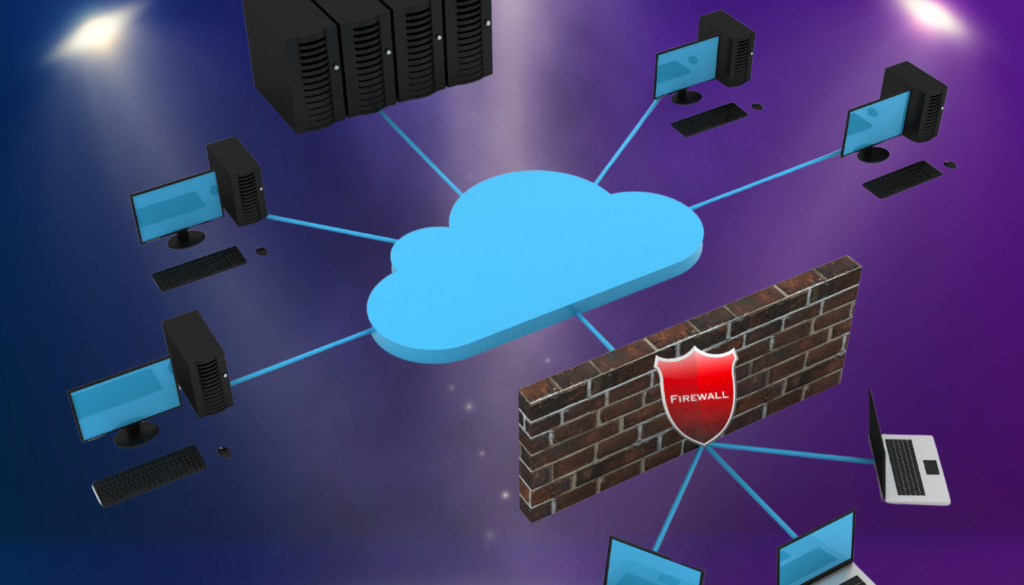
Network Address Translation (NAT) is a crucial component in ensuring network security. It functions by utilizing a firewall as an intermediary for both inbound and outbound network traffic. When incoming traffic enters the network, it is directed to a public-facing IP address. The firewall then translates this IP address to an internal IP address before forwarding the traffic to its intended destination. Similarly, outbound traffic’s source addresses are modified from private, internal IP addresses to public, external ones.
The purpose of this process is to enhance network security by comparing requested information to the results and allowing only legitimate traffic to pass through. NAT helps maintain network boundaries by forcing traffic to flow through the firewall for inspection before reaching its destination. Additionally, NAT adds an extra layer of privacy by obscuring the internal network structure from external sources.
To achieve this, a NAT firewall works in tandem with a dedicated firewall device. This device is responsible for the critical tasks of IP address translation and network traffic filtering, ensuring that only authorized traffic is permitted to enter or leave the network.
Benefits of NAT for Network Security
NAT also supports load balancing and failover mechanisms, distributing network traffic across multiple routers and firewalls. This helps prevent network congestion, improves overall network performance, and enhances the resilience of your network infrastructure.
Furthermore, NAT helps avoid IP address conflicts with other networks. By using private IP addresses within your network, you can prevent clashes with public IP addresses used by external networks, minimizing potential disruptions.
While NAT offers these benefits, it is important to note that it is not a standalone solution for network security. NAT should be used in conjunction with other security measures.
Types of NAT
When it comes to network security, there are different types of Network Address Translation (NAT) that you can choose from. Each type offers its own benefits and considerations, allowing you to find the right balance between IP address utilization, accessibility, and protection for your network. Let’s take a closer look at the three main types of NAT: static NAT, dynamic NAT, and port address translation (PAT).
Static NAT
Static NAT assigns a fixed public IP address to a private IP address. This type of NAT is commonly used when you need to allow external devices to access specific devices or services within your network. It offers a high level of accessibility since the assigned public IP address remains constant. Static NAT is particularly useful when you want to host public-facing servers or services securely.
Dynamic NAT
Dynamic NAT uses a pool of public IP addresses to map to multiple private IP addresses. This type of NAT adds an extra layer of security by making it harder for potential attackers to track and monitor your network traffic and activity. With dynamic NAT, the public IP addresses from the pool are dynamically assigned to private IP addresses as needed. This enables efficient use of IP addresses and provides a good balance between accessibility and protection.
Port Address Translation (PAT)
Port Address Translation (PAT), also known as overload NAT, uses a single public IP address to map to multiple private IP addresses. It differentiates between different connections by modifying the port numbers. PAT is commonly used in scenarios where you have a limited number of public IP addresses available but need to provide internet access to multiple devices within your network. This type of NAT offers a good balance between IP address utilization and accessibility while providing the necessary protection for your network.
| NAT Type | Advantages |
|---|---|
| Static NAT | Fixed IP addresses for specific devices or services |
| Dynamic NAT | Pool of IP addresses for multiple private addresses |
| Port Address Translation (PAT) | Single IP address with port number modification |
When selecting the most suitable type of NAT for your network security, it’s important to consider your specific requirements and preferences. Consult with network security experts who can assess your needs and recommend the most effective NAT type for your network environment. Additionally, regularly reviewing and adjusting your NAT configuration as your network evolves is essential to ensure efficient and reliable network security.
Implementing Steps for NAT Firewall
In NAT implementation, you will require a public IP address or a pool of public IP addresses for the NAT mapping. The configuration of NAT rules and policies on the device is necessary, specifying the type of NAT to use, the private IP addresses to map, and the public IP addresses or ports to use.
The device you choose for NAT implementation should have access to both the private and public networks and be able to route traffic accordingly. Planning, technical expertise, and attention to detail are crucial for successful NAT implementation.
| Steps for NAT Implementation | Description |
|---|---|
| 1. Select the appropriate NAT device | Choose a router or firewall capable of performing NAT functions |
| 2. Obtain a public IP address or pool | Secure a public IP address or a pool of public IP addresses for NAT mapping |
| 3. Configure NAT rules and policies | Specify the type of NAT to use and define the private IP addresses to map |
| 4. Ensure network connectivity | Verify that the NAT device has access to both the private and public networks |
| 5. Test and monitor | Conduct thorough testing and ongoing monitoring to ensure NAT implementation is working effectively |
Best Practices for NAT
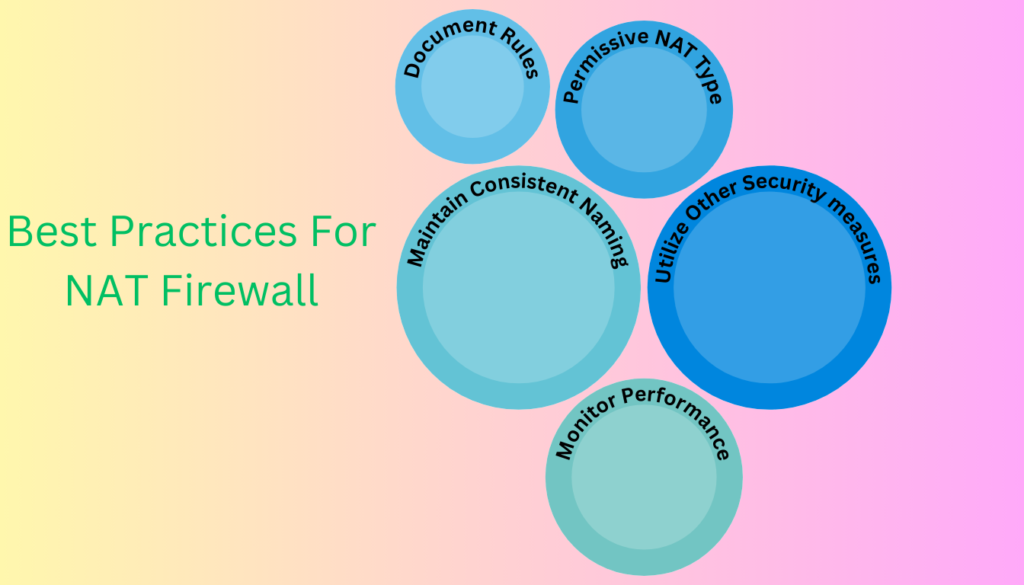
In order to ensure optimal network security while utilizing Network Address Translation (NAT), it is essential to follow a set of best practices. By implementing these practices, you can maximize the effectiveness of NAT in protecting your network and valuable digital assets.
- Utilize NAT in conjunction with other security measures: While NAT is an important component of network security, it should be used in combination with encryption, authentication, authorization, and filtering to provide comprehensive protection.
- Employ the least permissive NAT type: Select a NAT type that offers the balance between accessibility and protection that aligns with your network security needs.
- Maintain consistent naming conventions: Use clear and consistent naming conventions for both private and public IP addresses. This ensures easy management and reduces the risk of confusion or misconfiguration.
- Document NAT rules and policies: Documenting and regularly reviewing your NAT rules and policies helps maintain consistency, facilitates management, and ensures adherence to security standards.
- Monitor NAT performance: Regularly monitor and review the performance and usage of NAT to detect any anomalies or potential issues. This allows for optimizations that can enhance the efficiency and effectiveness of NAT in securing your network.
By following these best practices, you can leverage NAT as a valuable tool in your network security strategy. NAT, when implemented correctly and in conjunction with other security measures, provides enhanced security to protect your network from unauthorized access and cyber threats.
Challenges and Limitations of NAT
While implementing Network Address Translation (NAT) can provide numerous benefits for network security, it is important to be aware of the challenges and limitations it presents. These include:
End-to-End Connectivity
NAT can hinder end-to-end connectivity and transparency of the network. This can impact the functionality and compatibility of certain protocols and applications, making it more difficult to achieve seamless communication.
Complexity and Overhead
The implementation of NAT can add complexity and overhead to the network. It increases the processing and memory requirements of the NAT device, potentially leading to delays and errors in traffic. This can negatively impact network performance and reliability.
Network Troubleshooting and Analysis
NAT complicates network troubleshooting and analysis. Tracing and diagnosing network problems and incidents becomes more challenging, reducing visibility and accountability in the network. Network administrators and analysts may require additional tools and skills to effectively address issues.
Protocol Compatibility
The use of NAT can affect the compatibility of protocols and applications that rely on direct network connections. Some protocols may have difficulty traversing NAT boundaries, leading to communication failures or degraded performance.
| Challenges | Limitations |
|---|---|
| End-to-End Connectivity | Impact on functionality and compatibility of protocols and applications |
| Complexity and Overhead | Increased processing and memory requirements, potential delays and errors in traffic |
| Network Troubleshooting and Analysis | Complicated tracing and diagnosing of network problems and incidents |
| Protocol Compatibility | Difficulty for protocols to traverse NAT boundaries |
To overcome these challenges and limitations, careful consideration and planning should be given to the implementation of NAT for network security. Network administrators and analysts should stay informed about the potential drawbacks and complexities of NAT and adapt their network security strategies accordingly.
Importance of NAT
NAT plays a critical role in ensuring network security by offering various benefits to protect privacy, enhance scalability, and optimize IP address utilization. With the ever-increasing number of devices connected to the internet, NAT is crucial for managing IP addresses and securing network communication.
Privacy Protection
NAT helps protect privacy by allowing multiple private IP addresses to be mapped to a single public IP address. By hiding the internal network structure from the outside world, NAT prevents direct access to private networks, minimizing the risk of unauthorized access or attacks. This can also be achieved through VPNs that integrate NAT firewall, for example Surfshark.
Scalability and IP Address Conservation
In the IPv4 addressing scheme, there is a shortage of available IP addresses to accommodate the growing demand. NAT addresses this issue by conserving IP addresses through the mapping of multiple private IP addresses to a single public IP address. This optimization ensures efficient IP address utilization while accommodating the increasing number of devices connected to the internet.
Secure Network Communication
Implementing NAT provides an additional layer of security for network communication. By allowing devices to share a single public-facing IP address, NAT helps protect against potential security breaches, scan attempts, and unauthorized access. Additionally, NAT can help prevent IP address conflicts with other networks, ensuring smooth and secure network operations.
Overall, NAT plays a crucial role in network security by protecting privacy, enhancing scalability, and optimizing IP address utilization. By implementing NAT alongside other security measures, such as encryption, authentication, and authorization, organizations can create a robust and secure network environment.
Setting Up a NAT Firewall

To enhance the security of your network, setting up a NAT (Network Address Translation) firewall is crucial. Follow these steps to configure and enable a NAT firewall on your router:
Access your router settings
Open a web browser and enter the IP address of your router in the URL bar. This IP address is typically mentioned in the router’s manual or provided by your Internet Service Provider (ISP).
Locate the NAT settings
Once you have accessed the router settings, navigate to the NAT configuration section. This location may vary depending on the router’s firmware, so refer to the user manual or contact your router manufacturer for guidance.
Enable the NAT firewall
Within the NAT settings, you should find an option to enable or disable the NAT firewall. Enable the NAT firewall to activate the network security features.
Set up port forwarding rules
After enabling the NAT firewall, configure the port forwarding rules. Port forwarding allows you to specify which devices and ports are allowed or restricted for incoming and outgoing traffic. This is important for controlling network access and preventing unauthorized connections.
Save the NAT configuration
Once you have set up the port forwarding rules, remember to save the changes made to the NAT configuration. This ensures that the firewall settings are retained and applied each time the router is powered on or restarted.
Test connectivity
After configuring the NAT firewall and saving the changes, it’s essential to test the connectivity on both external and internal devices. This ensures that the NAT firewall is functioning correctly and not blocking any legitimate traffic.
The specific steps and options for NAT firewall setup may vary depending on your router’s make and model. It is recommended to consult the router’s user manual or contact the manufacturer for detailed instructions tailored to your device.
Steps in Setting Up a NAT
| Step | Actions |
|---|---|
| 1 | Access your router settings |
| 2 | Locate the NAT settings |
| 3 | Enable the NAT firewall |
| 4 | Set up port forwarding rules |
| 5 | Save the NAT configuration |
| 6 | Test connectivity |
By following these steps and leveraging the benefits of a NAT firewall, you can significantly enhance the security of your network and protect your valuable digital assets.
NAT Firewall Integration in VPN
| VPN Provider | NAT Firewall Feature | Description |
|---|---|---|
| ExpressVPN | No direct mention of NAT Firewall, but offers similar protections | ExpressVPN doesn’t explicitly advertise a NAT Firewall, but its server architecture and security protocols provide similar inbound traffic protection and privacy. |
| CyberGhost | Yes | CyberGhost includes NAT Firewall functionality as part of its security features to protect users’ devices from direct exposure to the internet. |
| Surfshark | No direct mention of NAT Firewall, focuses on CleanWeb | While not advertising a NAT Firewall per se, Surfshark’s CleanWeb feature offers ad, tracker, and malware protection, contributing to overall security. |
| Hotspot Shield | Yes | Hotspot Shield includes NAT Firewall protection to secure users’ internet connections by filtering incoming traffic and blocking unwanted requests. |
| NordVPN | Yes | NordVPN includes a NAT Firewall feature as part of its comprehensive security package, providing an additional layer of security to its users. |
Conclusion
Securing your network with a NAT firewall is an essential measure to protect your valuable digital assets and enhance network security. NAT, or network address translation, allows for the mapping of multiple private IP addresses to a single public IP address, reducing the attack surface and conserving IP address space.
By implementing NAT as part of your network security strategy, you can prevent direct access to your private network from the internet, improve network performance and reliability, and ensure comprehensive protection against cyber threats. It combines effectively with encryption, authentication, authorization, and filtering to create a robust network defense system.
While NAT has its challenges and limitations, understanding and properly deploying it can significantly enhance the security of your network. Take the necessary steps to secure your network with a NAT firewall, ensuring a secure internet connection and safeguarding your digital domain from potential threats.
FAQs on NAT Firewall
What is a NAT Firewall?
A NAT (Network Address Translation) Firewall is a network security feature that filters incoming internet traffic to protect devices on a private network. It allows multiple devices on a private network to share a single public IP address, managing and directing incoming traffic to the appropriate device while blocking unsolicited inbound traffic.
How does a NAT Firewall work?
A NAT Firewall works by modifying network address information in the IP headers of packets while they transit across a traffic routing device. For incoming traffic, it maps the public IP address to the correct private IP addresses of devices within the network, based on active connections or specific rules, effectively controlling access to the devices on the network.
Does a NAT Firewall provide complete security?
While a NAT Firewall significantly enhances network security by controlling inbound traffic and hiding the internal IP addresses of devices, it is not a complete security solution. It primarily protects against unsolicited inbound traffic but does not filter outbound traffic or protect against threats from malicious websites, viruses, or malware.
What is the difference between a NAT Firewall and a traditional firewall?
A NAT Firewall primarily focuses on managing and filtering incoming internet traffic to protect devices on a private network and does not involve deep packet inspection. A traditional firewall, however, can inspect the content of the data packets (deep packet inspection), applying a more comprehensive set of rules to both inbound and outbound traffic for enhanced security measures.
Can I use a NAT Firewall with a VPN?
Yes, many VPN services include a NAT Firewall as part of their offering to add an extra layer of security. The NAT Firewall works alongside the VPN by managing incoming traffic through the VPN’s server, offering protection without compromising the VPN’s encryption and privacy benefits.
How do I know if I have a NAT Firewall enabled?
The easiest way to check if you have a NAT Firewall enabled is to consult your internet router’s or VPN service’s documentation or settings interface. Most modern routers come with a NAT Firewall pre-configured, and many VPN services include it as a feature in their app or service settings.


